
Office Reader: For Microsoft Office3.0 - App Store
You'll be able to see results in few seconds.
Publisher Description
SPECIAL HOLIDAY PRICE TODAY!!! REGULAR PRICE $6.99
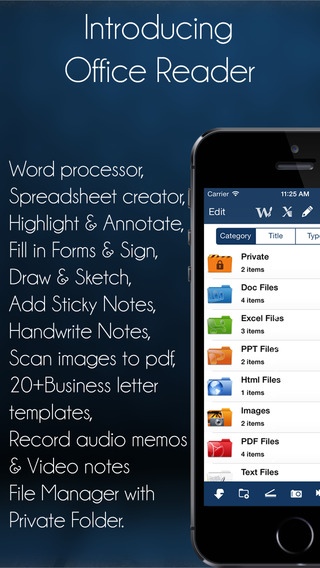
Office Reader is a powerful files and documents manager with an ALL IN ONE Office Suite allowing to create and edit Word documents and Spreadsheets files. Also included a full PDF Annotation with ability to fill-in forms and sign documents; Easy Drawing and Sketching tools. More importantly a High quality scanner to convert multi-page document into PDF.
INCLUDED
1. Word Processor (open, create and edit word files (doc & docx)
2. Spreadsheets creator (create excel file on the go)
3. Draw pad (Draw and sketch ideas on blank sheets or on existing documents)
4. Full-featured PDF annotation and forms (annotate & highlight pdf document, fill-in forms and sign documents)
5. Scan books and images to multipage PDF documents
EXTRA
. PDF Converter (Convert Word files to PDF)
. Audio recorder.
. Email multiple files
. Zip or compress multiple files
. Secret folder (password protected folder)
. Template letters.
. File Manager (Manage securely all your files in one app)
. Sync to Cloud services (Dropbox, Google Drive, OneDrive and WiFi.
VERY IMPORTANT: Please email us directly in the App, WE CANNOT REPLY ON REVIEW page of iTunes App Store.
SOME USES
* Open, Create, view and Edit Word documents on the go.
* Edit imported Word document or any Rich Text files.
* Convert Word document into PDF.
* Create and view Spreadsheet on the go.
* PDF Highlighter and annotations.
* Record lectures or audio comments on PDF document.
* Freehand Writing style and predefined shapes.
* Fill in Forms and Sign documents (Tax or Insurance).
* Scan images to multi-page PDF document.
* 20+ ready to use document and business letter templates,
* Draw graphics and sketches.
* Snap a photo, mark it up with shapes and text then share with friends.
* Secret folders for photo and files.
* Record audio notes.
* Record Video notes.
* Backup of documents.
* View all types of files.
* Multiple File Format supported
* File renaming
* Multi-selection file moving, copying, deleting, renaming, compressing.
* Multi-selection file to ZIP compression
* Multi file/folder email sending
* Folder creation
Create Word Documents with such formatting features as:
* Font type, color, and size
* Bulleted lists
* Tables and cells
* Bold, italics, and underlining
* Text alignment (left, center, and right)
* Predefined format for magazine and book
* Spell checker
* Dictionary
Spreadsheet:
* Create on the go spreadsheets
* Functions including addition, subtraction, multiplication, division, sin, etc...
* Edit spreadsheets created in Office Reader
* Change font size & colour, cell colour, underline, etc...
PDF Documents:
* Read, Edit and Annotate PDFs
* Sign documents
* Fill-in PDF forms
* Edit fields and checkboxes
* Highlighters & stamps, customize colors
* Attach images
* Add text
* Freehand writing
* Attach audio files to PDF document
Draw & Sketch:
* Draw on a blank page, photo, map, web page, or documents (including Word, PPT & excel)
* Choose highlighters and ink pens, customize your colours
* Type notes
* Use your finger or a stylus to draw or write
* Add photo
* Cut, copy, paste
* Sketch a photograph
* Share by email, print, Facebook and Twitter
Scan Multi-page documents:
* Scan Multipage Forms, Fill and Sign directly in the App.
* Adjust Frame before cropping and saving document.
* Crop and Rotate the document before saving
* Filter the document, Color, Black & white and Darker Options
* Print the Document or Sync with Dropbox
* Camera stabilization
* Quick capture Single Page Mode
Business Letter Templates
* Cover Letter
* Interview Prep List
* Sample Resume
* Introduction Letter
* Weekly Time Sheet
* and more..
This application supports 12 languages: English, Spanish, French, Portuguese, Italian, Russia, Danish, Dutch, German, Chinese, Japanese, Korean.
Requires iOS 7.0 or later. Compatible with iPhone, iPad, and iPod touch.
About Office Reader: For Microsoft Office
The company that develops Office Reader: For Microsoft Office is iCubemedia Inc.. The latest version released by its developer is 3.0.
To install Office Reader: For Microsoft Office on your iOS device, just click the green Continue To App button above to start the installation process. The app is listed on our website since 2012-11-29 and was downloaded 0 times. We have already checked if the download link is safe, however for your own protection we recommend that you scan the downloaded app with your antivirus. Your antivirus may detect the Office Reader: For Microsoft Office as malware if the download link is broken.
How to install Office Reader: For Microsoft Office on your iOS device:
- Click on the Continue To App button on our website. This will redirect you to the App Store.
- Once the Office Reader: For Microsoft Office is shown in the iTunes listing of your iOS device, you can start its download and installation. Tap on the GET button to the right of the app to start downloading it.
- If you are not logged-in the iOS appstore app, you'll be prompted for your your Apple ID and/or password.
- After Office Reader: For Microsoft Office is downloaded, you'll see an INSTALL button to the right. Tap on it to start the actual installation of the iOS app.
- Once installation is finished you can tap on the OPEN button to start it. Its icon will also be added to your device home screen.
Program Details
System requirements
Download information
Pricing
Version History
version 3.0
posted on 2012-11-29
Disclaimer
Official App Store Link
We do not host Office Reader: For Microsoft Office on our servers. We did not scan it for viruses, adware, spyware or other type of malware. This app is hosted by Apple and passed their terms and conditions to be listed there. We recommend caution when installing it.
The App Store link for Office Reader: For Microsoft Office is provided to you by apps112.com without any warranties, representations or guarantees of any kind, so access it at your own risk.
If you have questions regarding this particular app contact the publisher directly. For questions about the functionalities of apps112.com contact us.
